Main content:
      Basic coding skills
      How to work with numeric variables
      How to work with string variables
      How to use Java classes, objects, and methods
      How to use the console for input and output
      How to code simple control statements
      Two illustrative applications
      How to test and debug an application
          ---------------
1. Các vấn đề cơ bản:
    - Cách ghi chú trong java:
    // Sử dụng để ghi chú cho 1 dòng
    /*Ghi chú cho nhiều dòng*/
   
    - Bộ từ khóa ngôn ngữ java:
abstract       assert       boolean       break       byte       case      
catch          char         class         const       continue   default      
do             double       else          enum        extends    final
finally        float        for           goto        if         implements
import         instanceof   int           interface   long       native
new            package      private       protected   public     return      
short          static       strictfp      super       switch     synchronized
this           throw        throws        transient   try        void
volatile       while

    - Khai báo định danh: tên của lớp (class), phương thức (method) và biến (variables). Quy tắc khai báo định danh:
Định danh bắt đầu bằng một chữ cái, một ký tự gạch dưới _ hay dấu $, các ký tự tiếp theo: chữ 
cái, chữ số, dấu $, ký tự được gạch dưới.
+Mỗi định danh chỉ được chứa hai ký tự đặc biệt: dấu gạch dưới _ và dấu $ . Ngoài ra không 
được phép sử dụng bất kỳ ký tự đặc biệt nào khác.
Các định danh không được chứa dấu cách “  ” (space). 
     Ví dụ:
      Khai báo đúng tên định danh:
            olivia       second_place    _myName
            TheCure      ANSWER_IS_42    $variable
      Khai báo sai tên định danh:
            me+u         :-)             question?
            side-swipe   hi there        ph.d
            belles's     2%milk          kelly@yahoo.com


2. Các kiểu dữ liệu cơ bản:

3. Thêm các ký tự đặt biệt vào chuỗi:
    \n : xuống dòng mới
    \t : tab
    \r : xuống dòng
    \": thêm dấu " vào chuỗi
    \\: thêm dấu \ vào chuỗi

4. Câu lệnh if:
    Cú pháp:
               
Khuyết else
if (booleanExpression) {
       statements;
}
Đủ
if (booleanExpression) {
       statements1;
}else{
          statements2;
}
5. Câu lệnh while:
    Cú pháp:
while (booleanExpression) {
       //..
       statements
}

     
Bài tập:
 1. Viết chương trình nhập vào một số tự nhiên và đổi số đó ra hệ nhị phân:
Ví dụ: + Input n = 10 --> Output: 1010
           + Input n = 11 --> Output: 1011
Bài giải:
import java.util.Scanner;
public class Binary {
       public static void main(String[] args) {
              Scanner scanner = new Scanner(System.in);
              System.out.print("Nhap n = ");
              int n = scanner.nextInt();
              System.out.print("Đổi sang nhị phân: " + DecimalToBinary(n));
       }

       public static String DecimalToBinary(int n) {

              String Result = "";
              int du = 0;           
              while (n > 0) {
                     du = n % 2;
                     n = n / 2;
                     Result = du + Result;
              }           
              return Result;
       }
}

2. Viết chương trình nhập vào điểm toán, điểm lý và điểm hóa của một sinh viên và in ra điểm trung bình của 3 môn và xếp loại theo bảng dưới đây:
Bài giải:
import java.util.Scanner;

public class DiemTrungBinh {
       public static void main(String[] args) {
              float Toan, Ly, Hoa, DTB;
             
              Scanner scanner = new Scanner(System.in);
              System.out.print("Nhâp điểm toán, lý, hóa:");
              Toan = scanner.nextFloat();
              Ly = scanner.nextFloat();
              Hoa = scanner.nextFloat();
             
              DTB = (Toan + Ly + Hoa) / 3;
              if (DTB >= 8.0) {
                     System.out.println("Loại A");
              } else if (DTB >= 6.5) {
                     System.out.println("Loại B");
              } else if (DTB >= 5.0) {
                     System.out.println("Loại C");
              } else {
                     System.out.println("Loại D");
              }
       }
}

Kết quả:

3. Viết chương trình nhập vào một số nguyên và in ra đảo của số đó.
Ví dụ: nhập n = 12345 in ra kết quả: 54321.
Bài giải:
import java.util.Scanner;

public class DaoSo {
       public static void main(String[] args) {
              int n;
              Scanner scanner = new Scanner(System.in);
              System.out.print("Nhập số n: ");
              n = scanner.nextInt();
              System.out.print(DaoSo(n));
       }
      
       public static int DaoSo(int n)
       {
              int kq = 0;
              int i = 0;
              while (n > 0) {
                     kq = kq * 10 + (n % 10);
                     n = n / 10;
              }
              return kq;
       }
}

Kết quả:

4. Viết chương trình đổi số thập phân n sang hệ cơ số x bất kỳ.
Bài giải:
Bài giải:
import java.util.Scanner;

public class DaoSo {
       public static void main(String[] args) {
              Scanner scanner = new Scanner(System.in);
              System.out.print("Nhập số n, x: ");
              int n = scanner.nextInt();
              int x = scanner.nextInt();
              System.out.print(ChuyenCoSo(n, x));
       }
      
       public static int ChuyenCoSo(int n, int x)
       {
              String kq = "";
              String Hang [] = {"0", "1", "2", "3", "4", "5", "6", "7", "8", "9", "A", "B", "C", "D", "E", "F"};
    

              while (n > 0) {
                     kq = Hang[n % x] + kq;
                     n = n / x;

              }           
              return kq;
       }
}

   
 5. Viết chương trình nhập vào một chuỗi và in ra chuỗi đó với ký tự thường xen và in hoa xen kẽ nhau.
 Ví d:
 - Nhập chuỗi str = abcdef    --> in ra kết quả: aBcDeF
 - Nhập chuỗi str = abCDEf  --> in ra kết quả: aBcDeF  (giống kết quả trên)
Bài giải:

import java.util.Scanner;

public class XuLyChuoi {
     public static void main(String[] args) {
          Scanner scanner = new Scanner(System.in);
          String str = null;
          System.out.println("Nhap chuoi:");
          str = scanner.nextLine();
          System.out.print("Ket qua:");
          System.out.print(LowerCase_UpperCase(str));
     }
     public static String LowerCase_UpperCase(String st) {
          String result="";
          for (int i = 0; i <= st.length() - 1; i++ )
          {
              String kt = st.charAt(i) + "";
              if (i %2 != 0) {
                   kt = kt.toUpperCase();                   
              } else {
                   kt = kt.toLowerCase();
              }
              result = result + kt;
          }
          return result;
     }
}

kết quả:
 
Tài liệu Java Se API giúp tra cứu các lớp, phương thức:
- Online: http://docs.oracle.com/javase/7/docs/api/
- Download chm file: https://drive.google.com/file/d/0B8tAQ0_sJKCSVDVmcDBSS1E1VDQ/view?usp=sharing


   Main content:
Introduction to Java
How to use Eclipse to work with existing projects
How to use Eclipse to develop new projects
             ---------------
1. Cài đặt môi trường lập trình Java băng Eclipse:

    - Cài đặt JDK (Java Developent Kit), bộ công cụ phát triển ứng dụng bằng ngôn ngữ Java, là một tập hợp những công cụ phần mềm được phát triển bởi Sun Microsystems dành cho các nhà phát triển phần mềm, dùng để viết những applet Java hay những ứng dụng Java – bộ công cụ này được phát hành miễn phí gồm có trình biên dịch, trình thông dịch, trình giúp sửa lỗi (debugger, trình chạy applet và tài liệu nghiên cứu).
    - Lưu ý donwload đúng version JDK cho từng hệ điều hành.
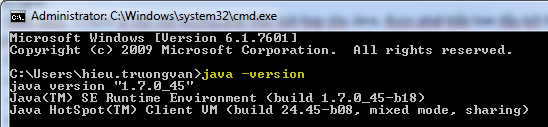
    - Để kiểm tra máy mình đang dùng java version nào, dùng cmd (command line) gõ lệnh:
      java -version
       Xem hình dưới:

2. Eclipse:
   - Giới thiệu: Eclipse là một môi trường phát triển tích hợp cho Java, được phát triển ban đầu bởi IBM, và hiện nay bởi tổ chức Eclipse. Ngoài Java, Eclipse còn hỗ trợ nhiều ngôn ngữ lập trình khác như PHP, C, C++, C#, Python, HTML, XML, JavaScript khi dùng thêm trình bổ sung (plug-in).
   - Link download Eclipse: http://www.eclipse.org/downloads/
     + Windows 32bit: http://www.eclipse.org/downloads/download.php?file=/technology/epp/downloads/release/mars/2/eclipse-java-mars-2-win32.zip
     + Window 64bit: http://www.eclipse.org/downloads/download.php?file=/technology/epp/downloads/release/mars/2/eclipse-java-mars-2-win32-x86_64.zip
3. Ví dụ: Tự dự án đầu tiên "HelloWorld"
    Mã nguồn:
     
public class HelloWorld {
       public static void main(String[] args) {
              System.out.println("Hello World");
       }
}
   Cách tạo dự án trên Eclipse:
    - Vào File --> New --> Chọn Java Project  (Xem hình bên dưới)
     
   
     - Cấu trúc dự án:

    - Lưu ý: Tệp tin chứa class có main(), cần lưu tên giống với tên class, ở ví dụ này là: HelloWorld.java

5. Build chương trình bằng command line:
    - Dùng lệnh:
         + Build mã nguồn sang *.class:   ..\javac.exe HelloWorld.java
         + Chạy chương trình:                   ..\java.exe HelloWorld

    - Xem hình bên dưới:


6. Bài tập:
    Bài 1: Viết ví dụ in ra dòng chữ Hello Java.

    Bài 2: 

    Bài 3: ...


Dựa theo sách Murach's Java Programming của tác giả Joel Murach
Bài 1: How to get started with Java and Eclipse (Chapter 1)
      Introduction to Java
      How to use Eclipse to work with existing projects
      How to use 
Eclipse to develop new projects
----------------------------------------------------------------------------------------

Bài 2: Introduction to Java programming (Chapter 2)
      Basic coding skills
      How to work with numeric variables
      How to work with string variables
      How to use Java classes, objects, and methods
      How to use the console for input and output
      How to code simple control statements
      Two illustrative applications
      How to test and debug an application
----------------------------------------------------------------------------------------

Bài 3: How to work with data (Chapter 3)
      Basic skills for working with data
      How to use Java classes for working with data types
      The formatted Invoice application
      How to use the BigDecimal class
----------------------------------------------------------------------------------------

Bài 4: How to code control statements (Chapter 4)
      How to code Boolean expressions
      How to code if/else and switch statements
      How to code loops
      How to code break and continue statements
      How to code and call static methods
----------------------------------------------------------------------------------------

Bài 5: Practice (Chapter 4)
----------------------------------------------------------------------------------------
Bài 6: How to validate input data (Chapter 5)
      How to handle exceptions
      How to validate data
      The Future Value application with data validation
          How to test and debug an application (Chapter 6)

      Basic skills for testing and debugging
      How to use Eclipse to debug an application
----------------------------------------------------------------------------------------

Bài 7: How to define and use classes (Chapter 7)
      An introduction to classes
      How to code a class that defines an object
      How to create and use an object
      How to code and use static fields and methods
      The Line Item application
----------------------------------------------------------------------------------------

Bài 8: Practice (Chapter 7)
----------------------------------------------------------------------------------------
Bài 9: How to work with inheritance (Chapter 8)
      An introduction to inheritance
      Basic skills for working with inheritance
      The Product application
      More skills for working with inheritance
      How to work with the abstract and final keywords
----------------------------------------------------------------------------------------

Bài 10: How to work with interfaces (Chapter 9)
      An introduction to interfaces
      How to work with interfaces
      A Product Maintenance application that uses interfaces
      How to implement the Cloneable interface

----------------------------------------------------------------------------------------
Bài 11: Other object-oriented programming skills (Chapter 10)
      How to work with packages
      How to use javadoc to document a package
      How to code classes that are closely related
      How to work with enumerations

----------------------------------------------------------------------------------------
Bài 12: How to work with arrays (Chapter 11)
      Basic skills for working with arrays
      More skills for working with arrays
       How to work with two-dimensional arrays
----------------------------------------------------------------------------------------

Bài 13: How to work with collections and generics (Chapter 12)
      An introduction to Java collections
      How to use the ArrayList class
      An Invoice application that uses an array list
      How to use the LinkedList class
      An enhanced version of the Invoice application
      How to work with maps
      How to work with legacy collections
----------------------------------------------------------------------------------------

Bài 14: Practice (Chapter 12)
----------------------------------------------------------------------------------------
Bài 15: How to work with dates and strings (Chapter 13)
      How to work with dates and times
      How to work with the String class
      How to work with the StringBuilder class
----------------------------------------------------------------------------------------

Bài 16: How to handle exceptions (Chapter 14)
      An introduction to exceptions
      How to work with exceptions
      How to work with custom exception classes

      How to work with assertions
----------------------------------------------------------------------------------------
Bài 17: How to work with text and binary files (Chapter 18)
      Introduction to directories and files
      Introduction to file input and output
      How to work with text files
      How to work with binary files

      How to work with random-access files
----------------------------------------------------------------------------------------
Bài 18: Practice – (Chapter 18)
----------------------------------------------------------------------------------------
Bài 19: How to work with XML (Chapter 19)
      Introduction to XML
      How to view and edit an XML file
      An introduction to three XML API

      How to use StAX to work with XML      
----------------------------------------------------------------------------------------
Bài 20: How to work with threads (Chapter 22)
      An introduction to threads
      How to create threads
      How to manipulate threads
      How to synchronize threads

      The Order Queue application
----------------------------------------------------------------------------------------
Bài 21: Ôn tập


1/ TextView:
     antoi

2/ EditText:


3/ Button:


4/ Image:


5/ CheckBox:


6/ RadioButton:


1/ Frame layout:

2/ Linear layout:
      orientation
        fill model
        weight
        gravity
        padding
      margin

3/ Relative layout:

4/ Table layout:

5/ Absolute layout:

6/ Scroll view:
Cách 1: Sử dụng hình ảnh
Bước 1: Để có 3 trạng thái của button gồm: 
   - pressed (khi bấm): 
   - focused (khi dùng phím di chuyển vào button thì button đó sẽ rơi vào trạng thái focus):
   - normal (bình thường) :

--> Chúng ta chuẩn bị 3 hình ảnh mô tả 3 trạng thái này của button này:  button_pressed.png, button_focused.png, button_normal.png và bỏ vào thư mục res/drawable trong dự án(nếu không có thư mục này thì tự tạo thêm)
import java.util.Scanner;

public class Binary {
       public static void main(String[] args) {
              Scanner scanner = new Scanner(System.in);
              System.out.print("Nhap n = ");
              int n = scanner.nextInt();
              System.out.print(DecimalToBinary(n));
       }
      
       public static String DecimalToBinary(int n) {
              String output = "";
              int du = 0;
             
              while (n > 0) {
                     du = n % 2;
                     n = n / 2;
                     output = du + output;
              }
             
              return output;
       }
}